


HERAKLES Otomatik Avlı kalıcı sunucu. 19 Haziran'da açılıyor. Atius & Wizard güvencesiyle hemen kayıt ol, ön kayıt ödülleri aktif. HEMEN TIKLA!
Whats the difference between searching the define macro in the whole project vs this?Hello everyone,
I want to introduce my small but very practical tool that helps you work with C++ source files and Python client files. It is designed to identify define blocks in source files and optionally scan Python client files for defines.
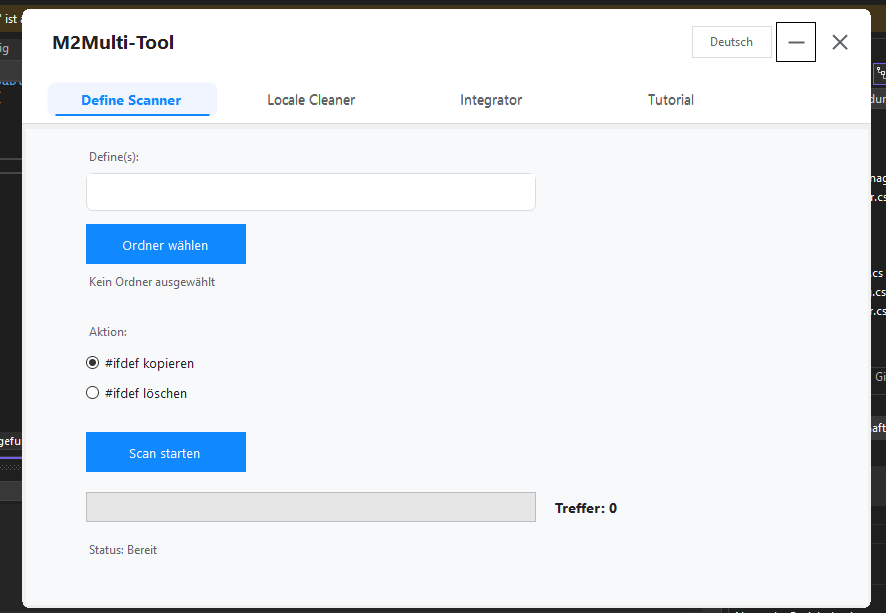
Core Features
- Define Scanner (C++ Source)
- Scans all .cpp and .h files in a selected folder.
- Finds complete #ifdef blocks for the provided defines.
- Option to copy or delete the blocks.
- Output is stored in structured folders under DefineScan_System with all files and block info.
- Client Scanner (Python)
- Optional scan of .py files in the client folder.
- Searches for if app. defines.
- Detects complete Python if-blocks, including nested blocks, elif and else.
- Output is stored in structured folders under DefineScan_Client.
- Flexible Define Input
- Multiple defines can be separated by comma, semicolon, or space.
How to use the tool
- Select Folder
- Choose the folder for system scan (.cpp / .h files).
- Optional: Enable “Scan Client” and select the client folder (.py files).
- Enter Defines
- Example: ENABLE_TEST, ENABLE_RENDER.
- Separate multiple defines with, , ; or space.
- Choose Action
- #ifdef copy -> blocks are saved in new folders.
- #ifdef delete -> blocks are removed from files (backup is created).
- Start Scan
- Click “Start Scan”.
- Progress bar shows current progress.
- Hits are counted and files are saved in output folders.
Actually in German and Englisch version , Turkish will be added today.
NEU!!! Tutorial-Bereich hinzugefügt!
Linkleri görebilmek için Turkmmo Forumuna ÜYE olmanız gerekmektedir.
Konu Sahibi
Konu Sahibi

The difference is mainly the workflow and convenience.Whats the difference between searching the define macro in the whole project vs this?
When you search for macros directly in Visual Studio, you have to:
- Manually search through all files
- Make sure VS isn’t only searching the current project
- Deal with slow search speeds, especially in large sources
My Define Scanner does it automatically and smarter:
- It scans all files, even the ones Visual Studio doesn’t have loaded in the project
- It filters only real defines instead of every occurrence of “#define”, including comments
- It shows the results neatly sorted by file, name, or value
- It saves time because you don’t need to configure anything or search manually
- It also finds macros in libraries, server/client mixes, and folders outside the solution
- You can further process the results (export, analysis, integrator, etc.)
In short:
VS can search, but my scanner can analyze and handle the Whole System with 1 Click e.g Copy , delete or Integrate


Şu an konuyu görüntüleyenler (Toplam : 0, Üye: 0, Misafir: 0)
Benzer konular

- Cevaplar
- 9
- Görüntüleme
- 587

- Cevaplar
- 64
- Görüntüleme
- 2K
- Cevaplar
- 4
- Görüntüleme
- 369

- Cevaplar
- 7
- Görüntüleme
- 3K

- Cevaplar
- 9
- Görüntüleme
- 776