


Ayyıldız2 | 2008 TR Yapısı • 1-99 Orta Emek Destan • Oto Avsız • 10 Temmuz 21:00 HEMEN TIKLA!
bunun için video çeksen nasıl yapıldığına dahil


Root game.py aratılır
F5 EKLEME
Altına eklenirKod:onPressKeyDict[app.DIK_F4] = lambda : self.__PressQuickSlot(7)
Kod:onPressKeyDict[app.DIK_F5] = lambda : self._VectorsHzl()
Game.py sonuna eklenir
Kod:def _VectorsHzl(self): import uiVectorsHzl self.VectorsHzl = uiVectorsHzl.VectorsKSK() self.VectorsHzl.Show()
root uiinventory.py aratılır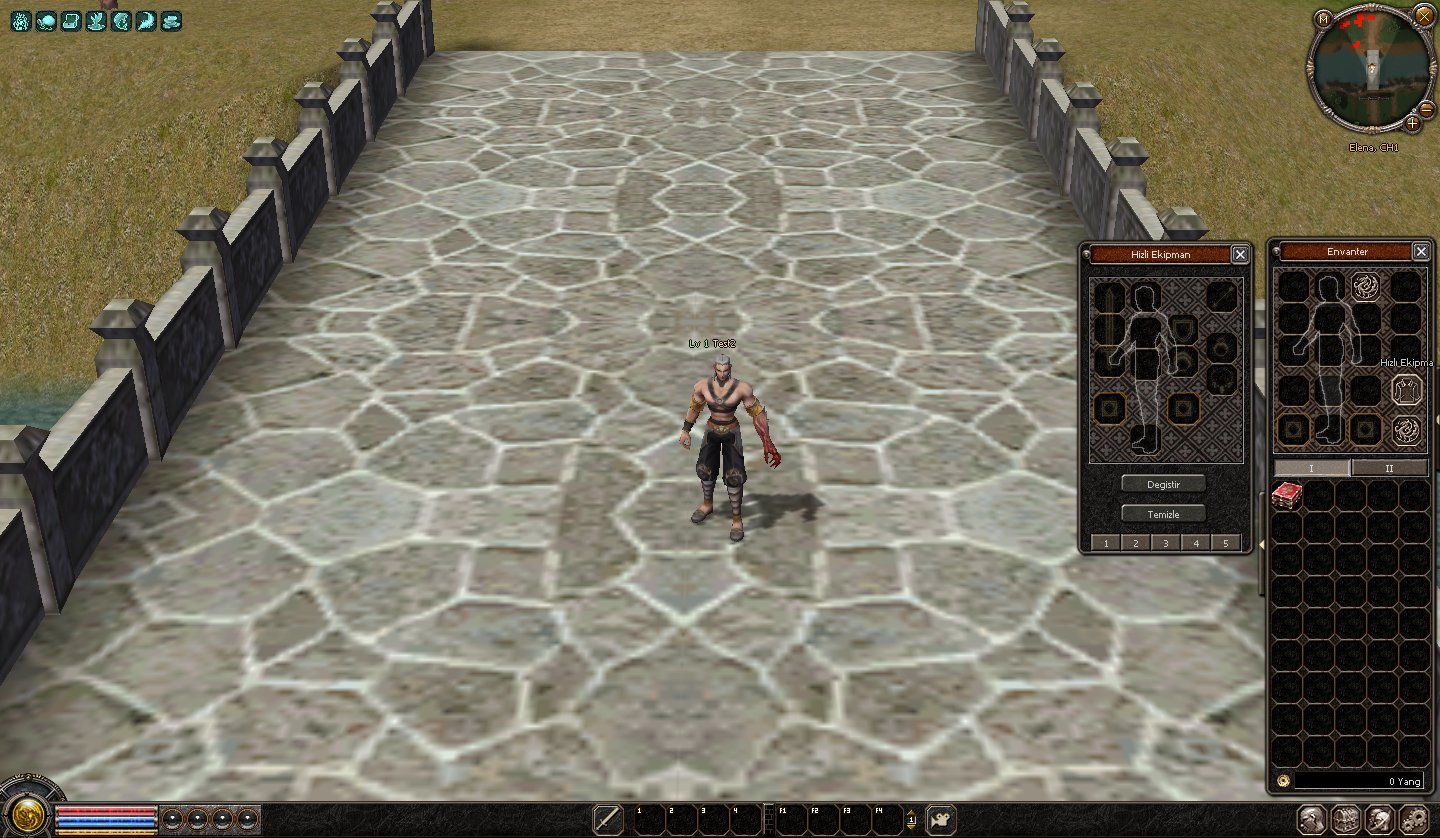
ENVANTER İÇİNE BUTON OLARAK EKLEME
altına eklenirKod:self.costumeButton = self.GetChild2("CostumeButton")
aratılırKod:self.VectorsHzl = self.GetChild2("VectorsHzl")
altına eklenirKod:# Costume Button if self.costumeButton: self.costumeButton.SetEvent(ui.__mem_func__(self.ClickCostumeButton)) self.wndCostume = None
aratılırKod:# Hzl Ekpmn if self.VectorsHzl: self.VectorsHzl.SetEvent(ui.__mem_func__(self._VectorsHzl)) self.wndCostume = None
altına eklenirKod:def ClickCostumeButton(self): print "Click Costume Button" if self.wndCostume: if self.wndCostume.IsShow(): self.wndCostume.Hide() else: self.wndCostume.Show() else: self.wndCostume = CostumeWindow(self) self.wndCostume.Show()
locale inventorywindow.py açılır aratılırKod:def _VectorsHzl(self): import uiVectorsHzl self.VectorsHzl = uiVectorsHzl.VectorsKSK() self.VectorsHzl.Show()
altına eklenirKod:## CostumeButton { "name" : "CostumeButton", "type" : "button", "x" : 78, "y" : 5, "tooltip_text" : uiScriptLocale.COSTUME_TITLE, "default_image" : "d:/ymir work/ui/game/taskbar/costume_Button_01.tga", "over_image" : "d:/ymir work/ui/game/taskbar/costume_Button_02.tga", "down_image" : "d:/ymir work/ui/game/taskbar/costume_Button_03.tga", },
locale/de & locale/tr (hangisini kullanıyorsanız.)Kod:{ "name" : "VectorsHzl", "type" : "button", "x" : 118, "y" : 107, "tooltip_text" : uiScriptLocale.HZL, "default_image" : "costume_01.tga", "over_image" : "costume_02.tga", "down_image" : "costume_03.tga", },
locale_interface.txt açılır en alta eklenir
Kod:HZL Hızlı EkipmanRoot uitaskbar.py aratılır
TASKBARA BUTON OLARAK EKLEME
altına eklenirKod:toggleButtonDict[TaskBar.BUTTON_CHAT]=self.GetChild("ChatButton")
aratılırKod:toggleButtonDict[TaskBar.BUTTON_HZL]=self.GetChild("VectorsHzl")
altına eklenirKod:BUTTON_CHAT = 4
interfacemodule.py aratılırKod:BUTTON_HZL = 5
altına eklenirKod:self.wndTaskBar.SetToggleButtonEvent(uiTaskBar.TaskBar.BUTTON_CHAT, ui.__mem_func__(self.ToggleChat))
aratılırKod:self.wndTaskBar.SetToggleButtonEvent(uiTaskBar.TaskBar.BUTTON_HZL, ui.__mem_func__(self.ToggleVectorsHzl))
altına eklenirKod:def ToggleChat(self):
locale taskbar.py aratılırKod:def ToggleVectorsHzl(self): import uiVectorsHzl self.VectorsHzl = uiVectorsHzl.VectorsKSK() self.VectorsHzl.Show()
altına eklenirKod:{ "name" : "MessengerButton", "type" : "button", "x" : SCREEN_WIDTH - 76, "y" : 3 + Y_ADD_POSITION, "tooltip_text" : uiScriptLocale.TASKBAR_MESSENGER, "default_image" : ROOT + "TaskBar/Community_Button_01.sub", "over_image" : ROOT + "TaskBar/Community_Button_02.sub", "down_image" : ROOT + "TaskBar/Community_Button_03.sub", },
locale/de & locale/tr (hangisini kullanıyorsanız.)Kod:{ "name" : "VectorsHzl", "type" : "button", "x" : SCREEN_WIDTH - 178, "y" : 3 + Y_ADD_POSITION, "tooltip_text" : uiScriptLocale.HZL, "default_image" : "costume_01.tga", "over_image" : "costume_02.tga", "down_image" : "costume_03.tga", },
locale_interface.txt açılır en alta eklenir
Kod:HZL Hızlı Ekipman
Taskbara ekleyenlerLinkleri görebilmek için Turkmmo Forumuna ÜYE olmanız gerekmektedir.siteden alt kısımdan kopyalasın yada down. edip eklesin.
.Rar içerisinde ki dosyalar root içine atılır.Kodları .Rar içerisinden kopyalayın.
Video gerekli bence
Şu an konuyu görüntüleyenler (Toplam : 0, Üye: 0, Misafir: 0)
Benzer konular

- Cevaplar
- 2
- Görüntüleme
- 325
- Cevaplar
- 13
- Görüntüleme
- 1K

- Cevaplar
- 16
- Görüntüleme
- 2K

- Cevaplar
- 16
- Görüntüleme
- 1K

- Cevaplar
- 24
- Görüntüleme
- 2K