


HTML Ve CSS Kodu Kullanarak Bildirim Çubuğu Oluşturun!
Bildirim Çubuğu Css Stili İçin Temel Bir Html Yapısı İle Başlayalım.
[CODE lang="html" title="Bildirim Çubuğu için HTML kodu"]<!DOCTYPE html>
<html lang="en">
<head>
<meta charset="UTF-8" />
<meta http-equiv="X-UA-Compatible" content="IE=edge" />
<meta name="viewport" content="width=device-width, initial-scale=1.0" />
<title>Document</title>
<link rel="stylesheet" href="style.css" />
<link
rel="stylesheet"
href="https://cdnjs.cloudflare.com/ajax/libs/font-awesome/5.15.4/css/all.min.css"
integrity="sha512-1ycn6IcaQQ40/MKBW2W4Rhis/DbILU74C1vSrLJxCq57o941Ym01SwNsOMqvEBFlcgUa6xLiPY/NS5R+E6ztJQ=="
crossorigin="anonymous"
referrerpolicy="no-referrer"
/>
</head>
<body>
<div class="container">
<input type="checkbox" name="" class="btn" />
<div class="box">
<div class="header">
<p>Notifications</p>
<a href="#">See all</a>
</div>
<div class="content">
<div class="notification">
<img src="harry.jpg" alt="" />
<div class="text">
<p>
<span class="name">Harry Potter</span> left a
comment.
</p>
<p class="time">1 hour age</p>
</div>
</div>
<div class="notification">
<img src="ron.jpg" alt="" />
<div class="text">
<p>
<span class="name">Ronald Weasley</span> liked
your post.
</p>
<p class="time">1 hour age</p>
</div>
</div>
<div class="notification">
<img src="hermione.jpg" alt="" />
<div class="text">
<p>
<span class="name">Hermione Granger</span>
reacted to your post.
</p>
<p class="time">1 hour age</p>
</div>
</div>
</div>
</div>
</div>
</body>
</html>[/CODE]
Bildirim çubuğu stili için tüm HTML kodu var. Şimdi css olmadan çıktıyı görebilirsiniz, ardından bildirim çubuğu css stilimiz için css yazıyoruz.
[CODE lang="css" title="Bildirim Çubuğu Stili için CSS"]@import url("https://fonts.googleapis.com/css2?family=Poppins&display=swap");* {
margin: 0;
padding: 0;
box-sizing: border-box;
font-family: "Poppins", sans-serif;
}
body {
height: 100vh;
display: flex;
justify-content: center;
align-items: center;
}
.container {
display: flex;
justify-content: center;
align-items: center;
position: relative;
}
.btn {
position: relative;
width: 25px;
height: 25px;
cursor: pointer;
appearance: none;
-webkit-appearance: none;
cursor: pointer;
transform: translateY(-150px);
}
.btn::before {
content: "f0f3";
position: absolute;
top: 50%;
left: 50%;
font-family: "Font Awesome 5 Free";
font-weight: 700;
font-size: 1.6em;
transform: translate(-50%, -50%);
}
.btn:checked ~ .box {
clip-path: polygon(0 0, 100% 0, 100% 100%, 0% 100%);
} /* box */
.box {
width: 350px;
margin-top: 2em;
position: absolute;
overflow: hidden;
border: 1px solid rgba(0, 0, 0, 0.137);
transition: all 0.4s;
clip-path: polygon(0 0, 100% 0, 100% 0, 0 0);
}
.header {
width: 100%;
display: flex;
justify-content: space-between;
padding: 0.6em 1em;
border-bottom: 1px solid rgba(0, 0, 0, 0.082);
}
.header a {
text-decoration: none;
}
.content {
width: 100%;
}
.notification {
width: 350px;
padding: 0.6em 1em;
display: flex;
align-items: center;
}
.notification img {
width: 50px;
height: 50px;
border-radius: 50px;
margin-right: 0.5em;
}
.notification .text p {
font-size: 0.8em;
}
.notification .text p span {
font-weight: 700;
}
.notification .text .time {
font-size: 0.7em;
color: rgba(0, 0, 0, 0.61);
}[/CODE]
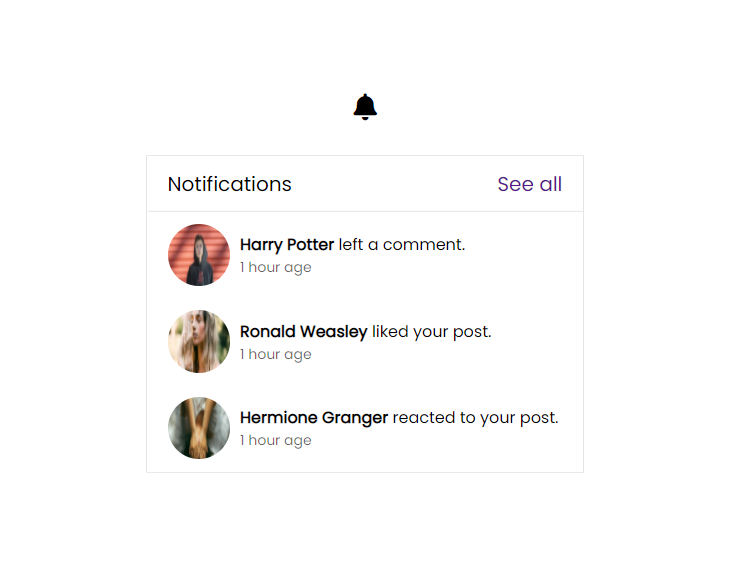
Şimdi css kodlu bölümümüzü tamamlıyoruz. İşte bildirim çubuğu stili için Html Ve css ile güncellenmiş çıktımız.
En Çok Reaksiyon Alan Mesajlar

Paylaşım için teşekkürler, eline sağlık


Paylaşım için teşekkürler.


Şu an konuyu görüntüleyenler (Toplam : 0, Üye: 0, Misafir: 0)
Benzer konular

- Cevaplar
- 2
- Görüntüleme
- 60
- Cevaplar
- 3
- Görüntüleme
- 94
- Cevaplar
- 2
- Görüntüleme
- 98
- Cevaplar
- 3
- Görüntüleme
- 186