


Ayyıldız2 | 2008 TR Yapısı • 1-99 Orta Emek Destan • Oto Avsız • 10 Temmuz 21:00 HEMEN TIKLA!
Önce yapı oluşturmak için html kodlamasını sonra css kullanarak stil yazıyoruz.
HTML Kodu
HTML:
<!DOCTYPE html>
<html lang="en">

<head>
  <meta charset="UTF-8">
  <meta http-equiv="X-UA-Compatible" content="IE=edge">
  <meta name="viewport" content="width=device-width, initial-scale=1.0">
  <title>Iconic Tab Bar - Pure CSS</title>
  <link rel="stylesheet" href="style.css">
</head>

<body>
  <nav class="menu">

    <input type="radio" name="nav-item" id="m-home" checked><label for="m-home">Home</label>
    <input type="radio" name="nav-item" id="m-search"><label for="m-search">Search</label>
    <input type="radio" name="nav-item" id="m-notification"><label for="m-notification">Notification</label>
    <input type="radio" name="nav-item" id="m-favorites"><label for="m-favorites">Favorites</label>
    <input type="radio" name="nav-item" id="m-profile"><label for="m-profile">Profile</label>

    <div class="selector"></div>
  </nav>
</body>

</html>
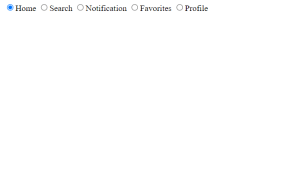
Yani html kodumuzu görünce şaşıracaksınız. Tüm bu html kodu div menüsündedir ve div'de html css kullanarak sekme çubuğumuz için giriş tipi radyo düğmesini kullanırız.
Yani aslında sekme çubuğuna tıkladık ve css kullandıktan sonra tamamen stil verdik ve bir tıklama efekti verdik. Html kodu için hepsi bu kadar.
Ardından CSS Kullanarak stil veriyoruz.
HTML Çıkışı
CSS Kodu
CSS:
:root {
  --icon: #b0bfd8;
}

body {
  width: 100%;
  height: 100vh;
  display: flex;
  justify-content: center;
  align-items: center;
  overflow: hidden;
  margin: 0;
  background-color: #e3efe8;
  background-image: linear-gradient(315deg, #e3efe8 0%, #96a7cf 74%);
}

nav.menu {
  display: flex;
  justify-content: space-between;
  position: relative;
  height: 150px;
  padding: 0 29px 10px;
  background: #fff0;
  align-items: flex-end;
  width: 600px;
}

nav.menu:before {
  content: "";
  width: 100%;
  height: 150px;
  background: #181818;
  position: absolute;
  left: 0;
  bottom: 0;
  border-radius: 20px;
  z-index: -1;
  box-shadow: 1px 1px 2px 0px #fff;
}

input {
  display: none;
}

label {
  text-decoration: none;
  font-family: sans-serif;
  text-transform: uppercase;
  font-size: 14px;
  min-width: 100px;
  height: 100px;
  margin: 10px 10px 20px;
  text-align: center;
  display: inline-grid;
  align-items: end;
  color: #b0bfd8;
  position: relative;
  transition: all 0.5s cubic-bezier(0.68, -0.55, 0.27, 1.55) 0s;
  cursor: pointer;
}

label:hover {
  color: #fff;
  text-shadow: 0 0 5px #fff, 0 0 10px #fff;
}

input:checked + label {
  color: #fff;
  height: 130px;
}

.selector {
  --hole: #2196f3;
  background: radial-gradient(
      circle at 50% 50%,
      #fff8 30px,
      #fff0 45px,
      #fff 50px,
      #fff0 50px 100%
    ),
    radial-gradient(circle at 50% 50%, var(--hole) 0 45px, #fff0 50px 100%),
    radial-gradient(circle at 50% 75px, #181818 0 70px, #fff0 71px 100%);
  width: 95px;
  height: 95px;
  position: absolute;
  bottom: 47px;
  left: 0;
  z-index: -1;
  transition: all 0.5s cubic-bezier(0.68, -0.55, 0.27, 1.55) 0s;
  border: 19px solid #181818;
  border-radius: 100%;
}

#m-home:checked ~ .selector {
  left: 23px;
}

#m-search:checked ~ .selector {
  left: 143px;
  filter: hue-rotate(535deg);
}

#m-notification:checked ~ .selector {
  left: 263px;
  filter: hue-rotate(950deg);
}

#m-favorites:checked ~ .selector {
  left: 383px;
  filter: hue-rotate(1580deg);
}

#m-profile:checked ~ .selector {
  left: 502px;
  filter: hue-rotate(1850deg);
}

.selector:after {
  content: "";
  position: absolute;
  bottom: -80px;
  width: 80px;
  height: 10px;
  background: #181818;
  left: calc(50% - 40px);
  border-radius: 5px 5px 15px 15px;
}

input:checked ~ .selector:after {
  box-shadow: 0 -17px 35px 8px var(--hole);
}

/*** ICONS ***/
label:before,
label:after {
  content: "";
  position: absolute;
  box-sizing: border-box;
  transition: all 0.5s ease 0s;
}

label:hover:before,
label:hover:after {
  filter: brightness(1.5) drop-shadow(0px 0px 4px #fff);
  transition: all 0.5s ease 0s;
}

input:checked + label:before,
input:checked + label:after {
  filter: brightness(1.5) drop-shadow(0px 0px 2px var(--sel));
  transition: all 0.5s ease 0s;
}

label[for="m-home"]:before {
  width: 40px;
  height: 40px;
  left: 30px;
  top: 30px;
  transition: all 0.5s cubic-bezier(0.68, -0.55, 0.27, 1.55) 0s;
  border-radius: 2px;
  background: conic-gradient(
      from 90deg at 65% 60%,
      var(--icon) 0 25%,
      #fff0 0 100%
    ),
    conic-gradient(from 180deg at 35% 60%, var(--icon) 0 25%, #fff0 0 100%),
    conic-gradient(from 135deg at 50% 0%, var(--icon) 0 25%, #fff0 0 100%);
  background-repeat: no-repeat;
  background-size: 100% 100%, 100% 100%, 100% 27px;
}

label[for="m-home"]:after {
  width: 40px;
  height: 40px;
  left: 30px;
  top: 24px;
  border: 6px solid var(--icon);
  border-right-width: 0;
  border-bottom-width: 0;
  transform: rotate(45deg);
  border-radius: 5px;
  transition: all 0.5s cubic-bezier(0.68, -0.55, 0.27, 1.55) 0s;
}

label[for="m-search"]:before {
  width: 40px;
  height: 40px;
  left: 20px;
  top: 17px;
  border: 6px solid var(--icon);
  border-radius: 100%;
  transition: all 0.5s cubic-bezier(0.68, -0.55, 0.27, 1.55) 0s;
}

label[for="m-search"]:after {
  width: 22px;
  height: 9px;
  left: 60px;
  top: 50px;
  transition: all 0.5s cubic-bezier(0.68, -0.55, 0.27, 1.55) 0s;
  background: var(--icon);
  transform-origin: left top;
  transform: rotate(45deg);
  border-radius: 0 10px 10px 0;
}

label[for="m-notification"]:before {
  width: 50px;
  height: 42px;
  left: 25px;
  top: 20px;
  z-index: 1;
  border-radius: 30px 30px 0 0;
  transition: all 0.5s cubic-bezier(0.68, -0.55, 0.27, 1.55) 0s;
  background: linear-gradient(
      90deg,
      #fff0 0 6px,
      var(--icon) 0 calc(100% - 6px),
      #fff0 calc(100% - 6px) 100%
    ),
    conic-gradient(from 135deg at 50% 33%, var(--icon) 0 25%, #fff0 0 100%);
}

label[for="m-notification"]:after {
  width: 10px;
  height: 57px;
  left: 45px;
  top: 14px;
  z-index: 0;
  transition: all 0.5s cubic-bezier(0.68, -0.55, 0.27, 1.55) 0s;
  background: radial-gradient(
      circle at 50% 6px,
      var(--icon) 3px,
      #fff0 4px 100%
    ),
    #fff0;
  transform-origin: left top;
  border-bottom: 6px solid var(--icon);
  border-radius: 5px;
}

label[for="m-favorites"]:before {
  width: 50px;
  height: 50px;
  left: 18px;
  top: -9px;
  transition: all 0.5s cubic-bezier(0.68, -0.55, 0.27, 1.55) 0s;
  background: radial-gradient(
      circle at 16px 16px,
      var(--icon) 0 16px,
      #fff0 calc(16px + 1px) 100%
    ),
    radial-gradient(
      circle at 34px 34px,
      var(--icon) 0 16px,
      #fff0 calc(16px + 1px) 100%
    ),
    linear-gradient(45deg, var(--icon) 0 37px, #fff0 38px 100%);
  border-radius: 17px 22px 17px 4px;
  transform: rotate(-45deg);
  transform-origin: center right;
}

label[for="m-profile"]:before {
  width: 50px;
  height: 54px;
  top: 16px;
  background: radial-gradient(
      circle at 50% 15px,
      var(--icon) 0 12px,
      #fff0 13px 100%
    ),
    radial-gradient(circle at 50% 100%, var(--icon) 0 22px, #fff0 23px 100%);
  left: 25px;
  border-radius: 8px;
}

input:checked + label {
  color: var(--sel);
  text-shadow: 0 0 5px var(--sel), 0 0 10px var(--sel);
}

input:checked + label[for="m-home"] {
  --sel: #39a1f4;
}

input:checked + label[for="m-search"] {
  --sel: #f48d4e;
}

input:checked + label[for="m-notification"] {
  --sel: #84a91c;
}

input:checked + label[for="m-favorites"] {
  --sel: #ff6275;
  height: 125px;
}

input:checked + label[for="m-profile"] {
  --sel: #9d74ff;
}

@media only screen and (orientation: portrait) {
  label {
    color: transparent !important;
    text-shadow: none !important;
  }
}
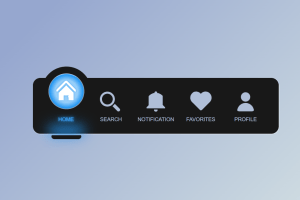
Bu, html css kullanan sekme çubuğumuz için css kodumuzdur. Ve bu css çok uzun. Öyleyse tüm css kodunun genel görünümünü anlayalım.
Css'de kök seçiciyi kullanarak değişkenler oluşturmak, ardından gövde ve menü etiketini biçimlendirmek gibi basit bir stil kullanıyoruz. Daha iyi animasyon ve efekt eklemek için sözde seçiciden önce kullanıyoruz.
Ardından, girdi türüne tam olarak odaklanıyoruz, böylece girdiyi stillendiriyoruz, ardından css'deki vurgulu seçiciyi kullanarak stil veriyoruz. Ardından, tüm simgeler için 5 farklı şekilde stil verdiğimiz gibi, simgemizi adım adım biçimlendiriyoruz. Bizim css sekme çubuğu projemiz bu kadar.
En Çok Reaksiyon Alan Mesajlar

Paylaşım için teşekkürler.

Konu Sahibi
Konu Sahibi
Rica EderimPaylaşım için teşekkürler.


Şu an konuyu görüntüleyenler (Toplam : 0, Üye: 0, Misafir: 0)
Benzer konular

- Cevaplar
- 2
- Görüntüleme
- 61
- Cevaplar
- 2
- Görüntüleme
- 98

- Cevaplar
- 9
- Görüntüleme
- 228