


Ayyıldız2 | 2008 TR Yapısı • 1-99 Orta Emek Destan • Oto Avsız • 10 Temmuz 21:00 HEMEN TIKLA!

HTML Kullanarak E-posta Şablonunu Oluşturun
E-posta şablonu, geleneksel HTML tekniklerine dayanır. Tüm zaman boyunca tablolarla ve <tr> tablo satırlarını ve <td> tablo verilerini istiflemeyle çalışacaksınız . Temel HTML e-posta şablonu şöyle görünür:
Kod:
<!DOCTYPE html>
<html lang="en">
 <head>
 <meta charset="UTF-8" />
 <meta http-equiv="X-UA-Compatible" content="IE=edge" />
 <meta name="viewport" content="width=device-width, initial-scale=1.0" />
 <title>MUO - Technology, Simplified</title>
 </head>
 <body>
 <table>
 <tbody>
 <tr>
 <td>...</td>
 </tr>
 <tr>...</tr>
 <tr>...</tr>
 <tr>...</tr>
 <tr>...</tr>
 <tr>...</tr>
 <tr>...</tr>
 <tr>...</tr>
 </tbody>
 </table>
 </body>
</html>
Çıktı:
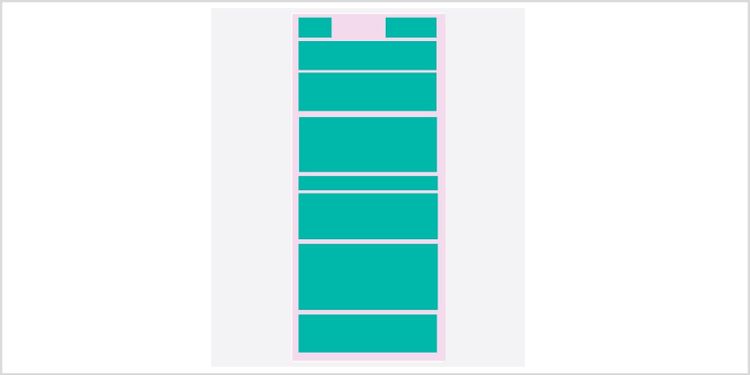
Burada, belge için DOCTYPE ile başlıyorsunuz. Sırada, <head> etiketinin içindeki karakter kümesini, içerik türünü, meta etiketleri ve başlığı ayarlarsınız . Temel kısım, bir üst <table> yerleştirdiğiniz ve içine birden çok tablo satırı <tr> eklediğiniz <body> etiketi ile başlar . İçeriği uygun sayıda satıra böldükten sonra, içerideki <td> tablo verilerini girme zamanı .
Söylendiği gibi, yalnızca tablolarla çalışmalısınız. Bu nedenle <td> etiketi içerisine farklı veriler girebilmek için tanımlı bir rota izlemeniz gerekir. Örneğin, bir <td> etiketi içinde bir logo ve tarih içeren bir e-posta şablonu oluşturalım.
Kod:
<tr>
 <td>
 <table>
 <tbody>
 <tr>
 <td>
 <!-- Logo and date inside <td> tag -->
 <table>
 <tbody>
 <tr>
 <td>
 <img src="example-logo.png" />
 </td>
 <td>
 <div>05 Dec, 2021</div>
 </td>
 </tr>
 </tbody>
 </table>
 </td>
 </tr>
 </tbody>
 </table>
 </td>
</tr>
Artık HTML etiketlerini nasıl yerleştireceğinizi ve e-posta şablonunuz için nasıl iyi bir yapı oluşturacağınızı biliyorsunuz. E-posta stilini daha iyi anlamak için ilerleyelim.
HTML E-postanızın Stilini Oluşturun
Yalnızca satır içi CSS'yi kullanabildiğiniz için bir HTML e-postasını şekillendirmek zahmetli bir iştir. Ayrıca, benzer bir stile sahipse her öğe için stili yinelemeniz gerekir. Basamaklı Stil Sayfalarına aşina değilseniz , CSS'yi kullanmaya başlamayı keşfedin.
Önizleme :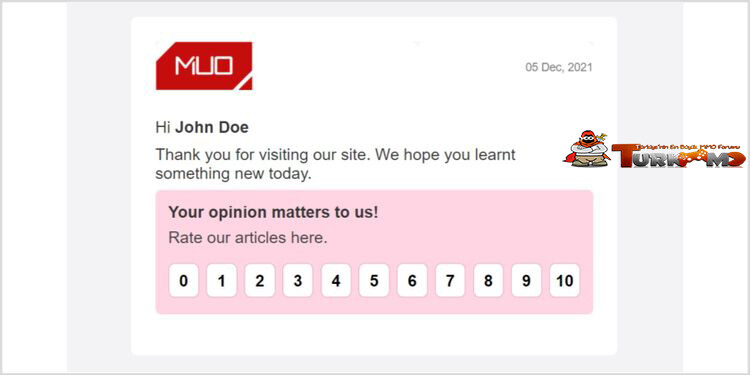
Kod:
<body style="font-family: Arial; margin: 0; font-size: 20px">
 <table style=" background-color: #f3f3f5; padding: 16px 12px; min-height: 100vh; width: 80%; margin: 0 auto; " >
 <tbody>
 <tr>
 <td style="vertical-align: top">
 <table border="0" width="600" cellpadding="0" cellspacing="0" align="center" style=" width: 600px !important; min-width: 600px !important; max-width: 600px !important; margin: auto; border-spacing: 0; border-collapse: collapse; background: white; border-radius: 8px; padding-left: 30px; padding-right: 30px; padding-top: 30px; padding-bottom: 30px; display: block; " >
 <tbody>
 <tr>
 <td style=" text-align: center; vertical-align: top; border-collapse: collapse; " >
 <table border="0" width="100%" cellpadding="0" cellspacing="0" bgcolor="#F8F8F8" style="border-spacing: 0; border-collapse: collapse" >
 <tbody>
 <tr style="background-size: cover">
 <td style=" width: 60%; text-align: left; border-collapse: collapse; background: #fff; border-radius: 10px 10px 0px 0px; color: white; height: 50px; " > <img src="https://www.makeuseof.com/public/build/images/muo-amp-logo.2eef8ce3.png" width="120px" class="CToWUd"/> </td>
 <td style=" width: 40%; text-align: right; border-collapse: collapse; background: #fff; border-radius: 10px 10px 0px 0px; color: white; height: 50px; " >
 <div style="color: #828282; font-size: 14px"> 05 Dec, 2021 </div>
 </td>
 </tr>
 </tbody>
 </table>
 </td>
 </tr>
 <tr>
 <td style="vertical-align: top; border-collapse: collapse">
 <table border="0" width="100%" cellpadding="0" cellspacing="0" bgcolor="#F8F8F8" style="border-spacing: 0; border-collapse: collapse" >
 <tbody>
 <tr>
 <td style=" padding-top: 30px; padding-bottom: 5px; background-color: white; " > <span style="color: #363636" >Hi <b>John Doe</b></span > </td>
 </tr>
 <tr>
 <td style=" padding-top: 5px; padding-bottom: 9px; background-color: white; " > <span style="color: #363636;" >Thank you for visiting our site. We hope you learnt something new today.</span > </td>
 </tr>
 <tr style="background-color: #ffd4e3">
 <td style=" padding: 16px; border-collapse: collapse; border-radius: 8px; " >
 <div style="color: #363636; font-weight: bold"> Your opinion matters to us! </div>
 <div style=" margin-top: 8px; color: #444; margin-bottom: 20px; " > Rate our articles here. </div>
 <div style="width: 100%; display: flex"> <span style=" width: 8%; padding-top: 9px; padding-bottom: 8px; border-radius: 20%; border: 1px solid #f4a1bd; display: block; margin-bottom: 5px; font-weight: bold; text-align: center; margin-right: 9px; background: #ffffff; " >0</span > <span style=" width: 8%; padding-top: 9px; padding-bottom: 8px; border-radius: 20%; border: 1px solid #f4a1bd; display: block; margin-bottom: 5px; font-weight: bold; text-align: center; margin-right: 9px; background: #ffffff; " >1</span > <span style=" width: 8%; padding-top: 9px; padding-bottom: 8px; border-radius: 20%; border: 1px solid #f4a1bd; display: block; margin-bottom: 5px; font-weight: bold; text-align: center; margin-right: 9px; background: #ffffff; " >2</span > <span style=" width: 8%; padding-top: 9px; padding-bottom: 8px; border-radius: 20%; border: 1px solid #f4a1bd; display: block; margin-bottom: 5px; font-weight: bold; text-align: center; margin-right: 9px; background: #ffffff; " >3</span > <span style=" width: 8%; padding-top: 9px; padding-bottom: 8px; border-radius: 20%; border: 1px solid #f4a1bd; display: block; margin-bottom: 5px; font-weight: bold; text-align: center; margin-right: 9px; background: #ffffff; " >4</span > <span style=" width: 8%; padding-top: 9px; padding-bottom: 8px; border-radius: 20%; border: 1px solid #f4a1bd; display: block; margin-bottom: 5px; font-weight: bold; text-align: center; margin-right: 9px; background: #ffffff; " >5</span > <span style=" width: 8%; padding-top: 9px; padding-bottom: 8px; border-radius: 20%; border: 1px solid #f4a1bd; display: block; margin-bottom: 5px; font-weight: bold; text-align: center; margin-right: 9px; background: #ffffff; " >6</span > <span style=" width: 8%; padding-top: 9px; padding-bottom: 8px; border-radius: 20%; border: 1px solid #f4a1bd; display: block; margin-bottom: 5px; font-weight: bold; text-align: center; margin-right: 9px; background: #ffffff; " >7</span > <span style=" width: 8%; padding-top: 9px; padding-bottom: 8px; border-radius: 20%; border: 1px solid #f4a1bd; display: block; margin-bottom: 5px; font-weight: bold; text-align: center; margin-right: 9px; background: #ffffff; " >8</span > <span style=" width: 8%; padding-top: 9px; padding-bottom: 8px; border-radius: 20%; border: 1px solid #f4a1bd; display: block; margin-bottom: 5px; font-weight: bold; text-align: center; margin-right: 9px; background: #ffffff; " >9</span > <span style=" width: 8%; padding-top: 9px; padding-bottom: 8px; border-radius: 20%; border: 1px solid #f4a1bd; display: block; margin-bottom: 5px; font-weight: bold; text-align: center; background: #ffffff; " >10</span > </div>
 </td>
 </tr>
 <tr>
 <td style="background: #ffffff; height: 20px"></td>
 </tr>
 <tr>
 <td bgcolor="#F8F8F8" style=" border-radius: 8px !important; border-collapse: collapse; " ></td>
 </tr>
 </tbody>
 </table>
 </td>
 </tr>
 </tbody>
 </table>
 </td>
 </tr>
 </tbody>
 </table>
</body>
Dilerseniz
Linkleri görebilmek için Turkmmo Forumuna ÜYE olmanız gerekmektedir.
onu kullanmak için depoyu klonlayabilirsiniz.Postayı Gönderme
Şimdi tüm kodu GitHub'dan kopyalayıp yapıştırın. VS Kodu kullanıyorsanız, canlı sunucu uzantısını kullanarak HTML dosyasını açın ve Ctrl + A > Ctrl + C öğelerine tıklayarak içeriği kopyalayın. Gmail'i açın ve yeni bir e-posta oluşturun. İçeriği yapıştırın ve alıcının posta kimliğini girin. E-postayı gönderin ve sonuçları aşağıda gösterildiği gibi alacaksınız:
Mevcut E-posta Şablonlarını Değiştirin
Sıfırdan bir HTML e-postası oluşturmak, HTML ve satır içi CSS'de sağlam bir tutuş gerektirir. Ayrıca mevcut bir e-posta şablonunu değiştirebilir ve ihtiyaçlarınıza göre özelleştirebilirsiniz. HTML e-postalarının yüklenmesinin birkaç saniye sürdüğünü unutmayın. Son kullanıcı tutarsızlıklarından kaçınmak için kapsamlı testler planlayın, tasarlayın, kodlayın ve gerçekleştirin. Daha iyi, daha erişilebilir kod yazmak için anlamsal HTML ve CSS hakkında daha fazla bilgi edinebilirsiniz.

Şu an konuyu görüntüleyenler (Toplam : 0, Üye: 0, Misafir: 0)
Benzer konular

- Cevaplar
- 2
- Görüntüleme
- 61

- Cevaplar
- 4
- Görüntüleme
- 297

- Cevaplar
- 1
- Görüntüleme
- 109
- Cevaplar
- 0
- Görüntüleme
- 168