


HERAKLES Otomatik Avlı kalıcı sunucu. 19 Haziran'da açılıyor. Atius & Wizard güvencesiyle hemen kayıt ol, ön kayıt ödülleri aktif. HEMEN TIKLA!
[FONT="]İNGİLİZCE BİLMEYENLER GOOGLE TRANSLATE DEN ÇEVİRSİN
TEŞEKKÜR BEKLİYORUM + REP
+ REP
KULLANIPDA 1 TEŞEKKÜR ETMEYENE HARAM OLSUN
Hello everyone![/FONT]
[FONT="]Many, many users didn't know how to save DDS file with Photoshop. I want to change that.[/FONT]
[FONT="]Step one[/FONT]
[FONT="]Download NVIDIA DDS plugin for Photoshop from here:
[FONT="]
 [/FONT]
[FONT="]Step two[/FONT]
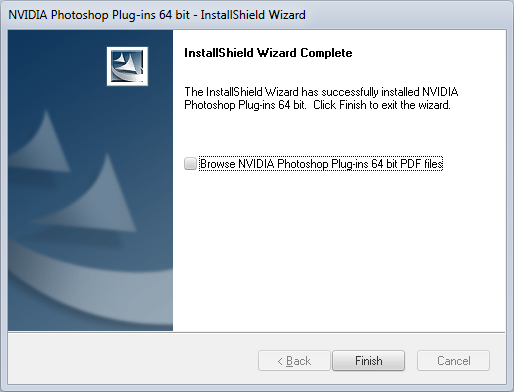
[FONT="]After downloading ends you must install this application.[/FONT]
[FONT="]
 [/FONT]
[FONT="]
 [/FONT]
[FONT="]Step three[/FONT]
[FONT="]Run Photoshop and open your file. (i'll open ymir work/pc2/assassin/assassin_4-1.dds)[/FONT]
[FONT="]
[FONT="]Step four[/FONT]
[FONT="]Save your file![/FONT]
[FONT="]
 [/FONT]
[FONT="]
 [/FONT]
[FONT="]You can easily find information about saving format - on this forum every men talking about DXT3... Yep, that's right and textures will show without blank spaces... But this saving only in 8 bpp (byte per pixel)... And that sucks. I strongly recommend to use 8.8.8.8 ARGB 32 bpp. Why? Because if you create HD model with HD texture... You must save texture in highest resolution. If you creating texture for armor you also need to save MIP-Maps (i can be wrong with that), while coding interface based on DDS files this isn't required. Of course you can use all ARGB file outputs, it depends on what you actually need.[/FONT]
[FONT="]Anyway, this should look like that.[/FONT]
[FONT="]
 [/FONT]
[FONT="]BONUS! Reflection effect![/FONT]
[FONT="]In this forum i never noticed how to make reflection effect on texture. I figure out how to do that and I'll share this information. I'll show you how to repair reflection on assassin_4-1.dds (this texture is copied from female assassin and someone didn't care about reflection... since Metin2 was released
 ).[/FONT]
[FONT="]1. Switch to "Channels" on right side of Photoshop.[/FONT]
[FONT="]
[FONT="]2. Compare "Alpha 1" and "RGB". It didn't match right?[/FONT]
[FONT="]
[FONT="]
[FONT="]3. Make Alpha 1 channel likely RGB channel (but leave only this thing you want to reflect! (honestly, i just copy Green channel to anoter file, remove things and copy that into right file channel)).[/FONT]
[FONT="]
[FONT="]Before (anyone can see it in client ^^):[/FONT]
[FONT="]
[FONT="]After:[/FONT]
[FONT="]
[FONT="]
[FONT="]Thanks for reading my not very good English ^^ Peace![/FONT]
[FONT="]You can download corrected version of assassin_4-1.dds here:
[/FONT]
[FONT="]
[/FONT]
TEŞEKKÜR BEKLİYORUM
+ REP KULLANIPDA 1 TEŞEKKÜR ETMEYENE HARAM OLSUN
Hello everyone![/FONT]
[FONT="]Many, many users didn't know how to save DDS file with Photoshop. I want to change that.[/FONT]
[FONT="]Step one[/FONT]
[FONT="]Download NVIDIA DDS plugin for Photoshop from here:
Linkleri görebilmek için Turkmmo Forumuna ÜYE olmanız gerekmektedir.
(You must choose between x86 and x64 version).[/FONT][FONT="]
[FONT="]Step two[/FONT]
[FONT="]After downloading ends you must install this application.[/FONT]
[FONT="]
[FONT="]
[FONT="]Step three[/FONT]
[FONT="]Run Photoshop and open your file. (i'll open ymir work/pc2/assassin/assassin_4-1.dds)[/FONT]
[FONT="]
Linkleri görebilmek için Turkmmo Forumuna ÜYE olmanız gerekmektedir.
[/FONT][FONT="]Step four[/FONT]
[FONT="]Save your file![/FONT]
[FONT="]
[FONT="]
[FONT="]You can easily find information about saving format - on this forum every men talking about DXT3... Yep, that's right and textures will show without blank spaces... But this saving only in 8 bpp (byte per pixel)... And that sucks. I strongly recommend to use 8.8.8.8 ARGB 32 bpp. Why? Because if you create HD model with HD texture... You must save texture in highest resolution. If you creating texture for armor you also need to save MIP-Maps (i can be wrong with that), while coding interface based on DDS files this isn't required. Of course you can use all ARGB file outputs, it depends on what you actually need.[/FONT]
[FONT="]Anyway, this should look like that.[/FONT]
[FONT="]
[FONT="]BONUS! Reflection effect![/FONT]
[FONT="]In this forum i never noticed how to make reflection effect on texture. I figure out how to do that and I'll share this information. I'll show you how to repair reflection on assassin_4-1.dds (this texture is copied from female assassin and someone didn't care about reflection... since Metin2 was released
[FONT="]1. Switch to "Channels" on right side of Photoshop.[/FONT]
[FONT="]
Linkleri görebilmek için Turkmmo Forumuna ÜYE olmanız gerekmektedir.
[/FONT][FONT="]2. Compare "Alpha 1" and "RGB". It didn't match right?[/FONT]
[FONT="]
Linkleri görebilmek için Turkmmo Forumuna ÜYE olmanız gerekmektedir.
[/FONT][FONT="]
Linkleri görebilmek için Turkmmo Forumuna ÜYE olmanız gerekmektedir.
[/FONT][FONT="]3. Make Alpha 1 channel likely RGB channel (but leave only this thing you want to reflect! (honestly, i just copy Green channel to anoter file, remove things and copy that into right file channel)).[/FONT]
[FONT="]
Linkleri görebilmek için Turkmmo Forumuna ÜYE olmanız gerekmektedir.
[/FONT][FONT="]Before (anyone can see it in client ^^):[/FONT]
[FONT="]
Linkleri görebilmek için Turkmmo Forumuna ÜYE olmanız gerekmektedir.
[/FONT][FONT="]After:[/FONT]
[FONT="]
Linkleri görebilmek için Turkmmo Forumuna ÜYE olmanız gerekmektedir.
[/FONT][FONT="]
Linkleri görebilmek için Turkmmo Forumuna ÜYE olmanız gerekmektedir.
[/FONT][FONT="]Thanks for reading my not very good English ^^ Peace![/FONT]
[FONT="]You can download corrected version of assassin_4-1.dds here:
Kod:
[URL]https://mega.co.nz/#!isUmwAKa!NBoEgGPsdB9iaskkIJf2aEY9SaSIbzMtt7gVwJ4fUWw[/URL]
Kod:
[COLOR=#222222][FONT=Verdana]https://www.virustotal.com/tr/url/71216ea7e98991af2c7f6226d581d2ba513e14cc585f8e8d0f6cf04bf112f755/analysis/1463421427/[/FONT][/COLOR][FONT="]
[/FONT]

- Durum
- Üzgünüz bu konu cevaplar için kapatılmıştır...
Şu an konuyu görüntüleyenler (Toplam : 0, Üye: 0, Misafir: 0)
Benzer konular

- Cevaplar
- 2
- Görüntüleme
- 58

- Cevaplar
- 4
- Görüntüleme
- 125

- Cevaplar
- 4
- Görüntüleme
- 104

- Cevaplar
- 8
- Görüntüleme
- 679

- Cevaplar
- 3
- Görüntüleme
- 147