


Normalde bu sistem ekli ama açılması için iki küçük ayar yapılması gerekiyor.
Açılır: root/game.py
Aratılır:
Değiştirilir:
Aratılır:
Altına eklenir:
K tuşuna basarak konsolu açabilirsiniz.
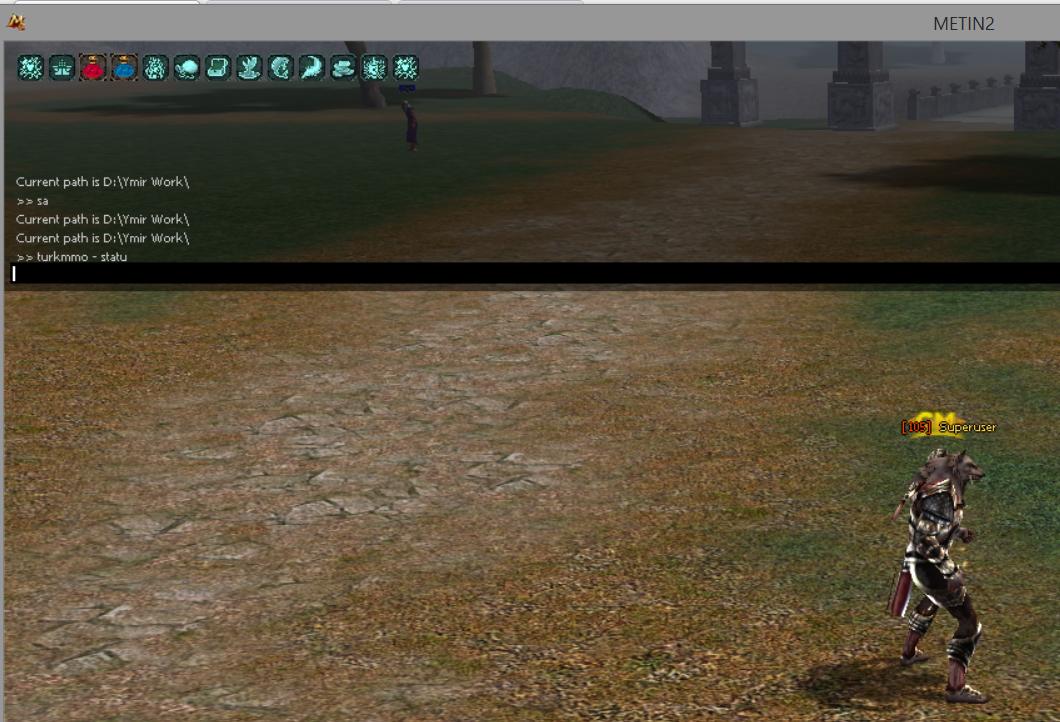
Açılır: root/game.py
Aratılır:
Kod:
self.consoleEnable = FALSEDeğiştirilir:
Kod:
self.consoleEnable = TRUEAratılır:
Kod:
onPressKeyDict[app.DIK_L] = lambda : self.interface.ToggleChatLogWindow()Altına eklenir:
Kod:
onPressKeyDict[app.DIK_[K] = lambda : self.ShowConsole()K tuşuna basarak konsolu açabilirsiniz.
Moderatör tarafında düzenlendi:
En Çok Reaksiyon Alan Mesajlar

Örnek Kodlar
Rendering options:
exit - Force close the client
mvol - Change the music volume between 0 - 10
svol - Change the sound volume between 0 - 10
snds - Change the volume of the interactive sounds (mobs, hit etc...) between 0 - 200
asnds - Change the volume of the ambience between 0 - 200
mspd - Change the moving speed between 0 - 1100
pwd - Show the current folder path (D:\ymir work)
ls - Show the folders in D:\ymir work
shadow - Change the shadow level between 0 - 5
splat - Set the rendering distance between the character and the ambience 0 - ∞
distance - Change the view distance between 0 - 4
bgloading - This function is disabled in the binary!
transtree - Enable or disable the transparency of the trees 0 - 1
cd - CD to directory, like in bat files (cd ..)
up - Go up in the folder structure (D:\ymir work)
lsd - List all directories on the D:\ partition
lsf - List all files on the D:\ partition
lse - Show the path of the effects (D:\ymir work\effect)
collision - 0 - 1
colli - Equal with the collision function without argument, turn on/off the highlighting
disconnect - Unfinished function!
autorot - Set the rotation moving speed of the camera while pressing the A/D keys 0 - ∞
pickc - Show char informations, isRegistered, isAlive, isDead
infoc - Information of another thing, usage: infoc <VID>
regchre - Register new effect on the char, usage: regchre <effectType> and <effectFilename>
setchra - Set character effect, usage: setchra <effectType> <Visibility 0 or 1>
emoticon - Set emotion effect over the character, usage: emotion <number of the emoticon>
perfinfo - Show performance informations (?)
reload_locale - Reload the locale
re - Reload uiGuild and uiInventory
cooltime - Disable or enable the skills cooltime
hidecursor - Hide the cursor
showcursor - Show the cursor
warp - Warp to x-y position
web - Pop out a web browser
hideui - Hide the user interface
showui - Show the user interface
setcspd - Change the camera moving speed 0 - ∞
savecmr - Export the current camera settings to the client folder, usage: savecmr <filename>
loadcmr - Import camera settings, usage: loadcmr <filename in the client folder>
setdefcmr - Set to default the camera settings
setsight - Change the sight 0 - 100
setcombotype - Set the level of the combo, the server will kick you after few seconds because of combo hack check
trans - Change the empire language converting, you can understand all empires without a ring 0 - 1
setrmadd
se*****d
setrmaddrgb
se*****drgb
setspec
restorerm

ingilizce bilmeyenler ne yapıcak 2 saat google transletedenmi ceviricek
orda yazılanları çevirmek için 4. sınıfta ingilizce görmek yeterli bence zor değilki

Örnek Kodlar
- exit - Force close the client
- mvol - Change the music volume between 0 - 10
- svol - Change the sound volume between 0 - 10
- snds - Change the volume of the interactive sounds (mobs, hit etc...) between 0 - 200
- asnds - Change the volume of the ambience between 0 - 200
- mspd - Change the moving speed between 0 - 1100
- pwd - Show the current folder path (D:\ymir work)
- ls - Show the folders in D:\ymir work
- shadow - Change the shadow level between 0 - 5
- splat - Set the rendering distance between the character and the ambience 0 - ∞
- distance - Change the view distance between 0 - 4
- bgloading - This function is disabled in the binary!
- transtree - Enable or disable the transparency of the trees 0 - 1
- cd - CD to directory, like in bat files (cd ..)
- up - Go up in the folder structure (D:\ymir work)
- lsd - List all directories on the D:\ partition
- lsf - List all files on the D:\ partition
- lse - Show the path of the effects (D:\ymir work\effect)
- collision - 0 - 1
- colli - Equal with the collision function without argument, turn on/off the highlighting
- disconnect - Unfinished function!
- autorot - Set the rotation moving speed of the camera while pressing the A/D keys 0 - ∞
- pickc - Show char informations, isRegistered, isAlive, isDead
- infoc - Information of another thing, usage: infoc <VID>
- regchre - Register new effect on the char, usage: regchre <effectType> and <effectFilename>
- setchra - Set character effect, usage: setchra <effectType> <Visibility 0 or 1>
- emoticon - Set emotion effect over the character, usage: emotion <number of the emoticon>
- perfinfo - Show performance informations (?)
- reload_locale - Reload the locale
- re - Reload uiGuild and uiInventory
- cooltime - Disable or enable the skills cooltime
- hidecursor - Hide the cursor
- showcursor - Show the cursor
- warp - Warp to x-y position
- web - Pop out a web browser
- hideui - Hide the user interface
- showui - Show the user interface
- setcspd - Change the camera moving speed 0 - ∞
- savecmr - Export the current camera settings to the client folder, usage: savecmr <filename>
- loadcmr - Import camera settings, usage: loadcmr <filename in the client folder>
- setdefcmr - Set to default the camera settings
- setsight - Change the sight 0 - 100
- setcombotype - Set the level of the combo, the server will kick you after few seconds because of combo hack check
- trans - Change the empire language converting, you can understand all empires without a ring 0 - 1
- setrmadd
- se*****d
- setrmaddrgb
- se*****drgb
- setspec
- restorerm
Şu an konuyu görüntüleyenler (Toplam : 0, Üye: 0, Misafir: 0)
Benzer konular
- Cevaplar
- 18
- Görüntüleme
- 2K
- Cevaplar
- 1
- Görüntüleme
- 481
- 5.00 yıldız(lar) 1 Değerlendirme
- Cevaplar
- 4
- Görüntüleme
- 1K
- Çözüldü
- Cevaplar
- 4
- Görüntüleme
- 1K
- Cevaplar
- 1
- Görüntüleme
- 1K