


Merhaba arkadaşlar. Yapboz oyununu sever misiniz? Bugün vb.net'te basit bir puzzel yapalım istiyorum. Öyle fazla abartılı büyük olmasin. 4 sütun 3 satirdan olussa kâfidir ssanırım.O zaman hemen visual studiomuzu açıp yeni bir proje başlatalım ve formumuza 12 + 1 tane picturebox yerleştirelim. Unutmayın yukarıda belirttigimiz gibi 4x3 olacak.
Simdi de hemen bir resim seçelim ve bu resmi 12 eşit parçaya ayıralım. Ayırdıgımız parçalara 1,2,3... veya resim1, resim2, resim3... gibi muntazaman isimler verelim.
Burada dikkat etmemiz gereken husus resmin bir parçasının ve pictureboxlarin boyutlarının aynı olması gerektiğidir. Aksi taktirde bazi uyumsuzluklar yaşanabilir.
Simdi sıra geldi 12 parçaya ayrılmış resmimizi projemize eklemeye. Projemizin oldugu klasöre yeni bir klasör açip (mesela: resimler) parçalara ayirdigimiz resimleri oraya kopyalayalım.
Formumuza eklediğimiz pictureboxlara o resimleri gelişigüzel yerleştirelim Fakat pictureboxun biri boş kalsın, yani resmin bir parçasını kullanmayacağiz. Ben resim4'ü kullanmadım mesela. Siz de köselere gelen resimlerden birini seçin ve onu kullanmayın.
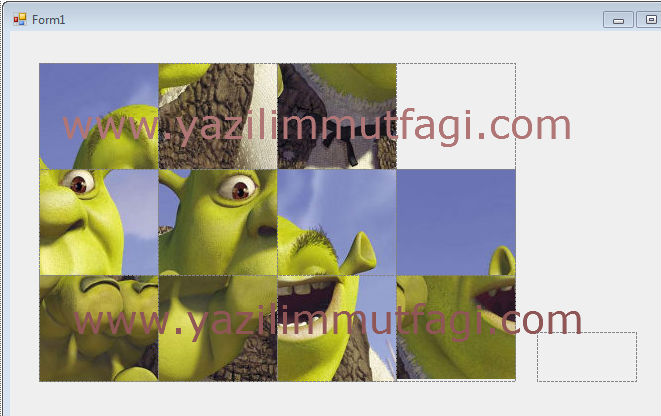 Gelelim programımızın kodlarına ve program mantığına : Yapbozun herhangı bir parçasına tıkladığımız zaman, eger varsa, yanındaki boş kareye geçmeli. Puzzel tahtamızta tek bir kare boş kalacaktı hatırlarsanız. Bizim yapmamız gereken en önemli şey tıklanan parçanın yanında boş kare var mı? Varsa hangi tarafında? Bunu bildirirsek işimiz kolaydır.
Bu noktada hayal gücümüze birazcık iş düşüyor o kadar.
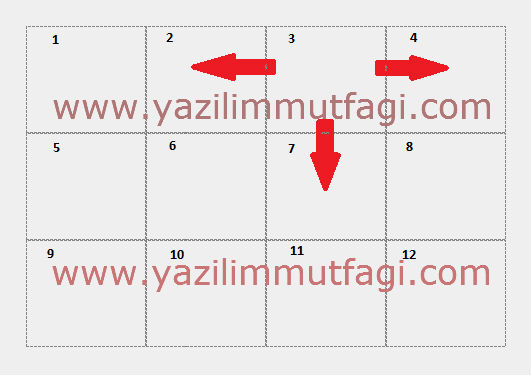 Resimde de gördüğünüz gibi 3'üncü parçanın kayabileceği üç yer var: 2'inci parça, 4'üncü parça ve 7'inci parça. Bunu vb.net dilinde şu sekilde yazabiliriz:
Private Sub PictureBox3_Click(ByVal sender As System.Object, ByVal e As System.EventArgs) Handles PictureBox3.Click
If PictureBox4.Image Is PictureBoxBos.Image Then
PictureBox4.Image = PictureBox3.Image
PictureBox3.Image = PictureBoxBos.Image
ElseIf PictureBox2.Image Is PictureBoxBos.Image Then
PictureBox2.Image = PictureBox3.Image
PictureBox3.Image = PictureBoxBos.Image
ElseIf PictureBox7.Image Is PictureBoxBos.Image Then
PictureBox7.Image = PictureBox3.Image
PictureBox3.Image = PictureBoxBos.Image
End If
End Sub
Burada dikkatinizi PictureBoxBos çekmiştir. Hani başta 12 + 1 tane picturebox yerleştirin demiştim ya? İşte sebebi buydu. Yani boş bıraktığımız pictureboxu, üzerine tıkladığımız pictureboxun boş olup olmadığını karşılastırırken kullanıyoruz. "Eger picturebox3 eşittir pictureboxbos ise..."
Birinci kareye bakalım bir de:
Private Sub PictureBox1_Click(ByVal sender As System.Object, ByVal e As System.EventArgs) Handles PictureBox1.Click
If PictureBox5.Image Is PictureBoxBos.Image Then
PictureBox5.Image = PictureBox1.Image
PictureBox1.Image = PictureBoxBos.Image
ElseIf PictureBox2.Image Is PictureBoxBos.Image Then
PictureBox2.Image = PictureBox1.Image
PictureBox1.Image = PictureBoxBos.Image
End If
End Sub
Gördüğünüz gibi son derece basit.
Program mantığını tekrar etmek gerekirse: Yapbozun herhangi bir parçasına tıkladığımız zaman, eger varsa, yanındaki boş kareye geçmeli.
[h=4]Kodlarin tamamı:[/h] Public Class Form1
Private Sub PictureBox1_Click(ByVal sender As System.Object, ByVal e As System.EventArgs) Handles PictureBox1.Click
If PictureBox5.Image Is PictureBoxBos.Image Then
PictureBox5.Image = PictureBox1.Image
PictureBox1.Image = PictureBoxBos.Image
ElseIf PictureBox2.Image Is PictureBoxBos.Image Then
PictureBox2.Image = PictureBox1.Image
PictureBox1.Image = PictureBoxBos.Image
End If
End Sub
Private Sub PictureBox2_Click(ByVal sender As System.Object, ByVal e As System.EventArgs) Handles PictureBox2.Click
If PictureBox1.Image Is PictureBoxBos.Image Then
PictureBox1.Image = PictureBox2.Image
PictureBox2.Image = PictureBoxBos.Image
ElseIf PictureBox3.Image Is PictureBoxBos.Image Then
PictureBox3.Image = PictureBox2.Image
PictureBox2.Image = PictureBoxBos.Image
ElseIf PictureBox6.Image Is PictureBoxBos.Image Then
PictureBox6.Image = PictureBox2.Image
PictureBox2.Image = PictureBoxBos.Image
End If
End Sub
Private Sub PictureBox3_Click(ByVal sender As System.Object, ByVal e As System.EventArgs) Handles PictureBox3.Click
If PictureBox4.Image Is PictureBoxBos.Image Then
PictureBox4.Image = PictureBox3.Image
PictureBox3.Image = PictureBoxBos.Image
ElseIf PictureBox2.Image Is PictureBoxBos.Image Then
PictureBox2.Image = PictureBox3.Image
PictureBox3.Image = PictureBoxBos.Image
ElseIf PictureBox7.Image Is PictureBoxBos.Image Then
PictureBox7.Image = PictureBox3.Image
PictureBox3.Image = PictureBoxBos.Image
End If
End Sub
Private Sub PictureBox4_Click(ByVal sender As System.Object, ByVal e As System.EventArgs) Handles PictureBox4.Click
If PictureBox3.Image Is PictureBoxBos.Image Then
PictureBox3.Image = PictureBox4.Image
PictureBox4.Image = PictureBoxBos.Image
ElseIf PictureBox8.Image Is PictureBoxBos.Image Then
PictureBox8.Image = PictureBox4.Image
PictureBox4.Image = PictureBoxBos.Image
End If
End Sub
Private Sub PictureBox5_Click(ByVal sender As System.Object, ByVal e As System.EventArgs) Handles PictureBox5.Click
If PictureBox1.Image Is PictureBoxBos.Image Then
PictureBox1.Image = PictureBox5.Image
PictureBox5.Image = PictureBoxBos.Image
ElseIf PictureBox6.Image Is PictureBoxBos.Image Then
PictureBox6.Image = PictureBox5.Image
PictureBox5.Image = PictureBoxBos.Image
ElseIf PictureBox9.Image Is PictureBoxBos.Image Then
PictureBox9.Image = PictureBox5.Image
PictureBox5.Image = PictureBoxBos.Image
End If
End Sub
Private Sub PictureBox6_Click(ByVal sender As System.Object, ByVal e As System.EventArgs) Handles PictureBox6.Click
If PictureBox2.Image Is PictureBoxBos.Image Then
PictureBox2.Image = PictureBox6.Image
PictureBox6.Image = PictureBoxBos.Image
ElseIf PictureBox5.Image Is PictureBoxBos.Image Then
PictureBox5.Image = PictureBox6.Image
PictureBox6.Image = PictureBoxBos.Image
ElseIf PictureBox7.Image Is PictureBoxBos.Image Then
PictureBox7.Image = PictureBox6.Image
PictureBox6.Image = PictureBoxBos.Image
ElseIf PictureBox10.Image Is PictureBoxBos.Image Then
PictureBox10.Image = PictureBox6.Image
PictureBox6.Image = PictureBoxBos.Image
End If
End Sub
Private Sub PictureBox7_Click(ByVal sender As System.Object, ByVal e As System.EventArgs) Handles PictureBox7.Click
If PictureBox6.Image Is PictureBoxBos.Image Then
PictureBox6.Image = PictureBox7.Image
PictureBox7.Image = PictureBoxBos.Image
ElseIf PictureBox3.Image Is PictureBoxBos.Image Then
PictureBox3.Image = PictureBox7.Image
PictureBox7.Image = PictureBoxBos.Image
End If
If PictureBox8.Image Is PictureBoxBos.Image Then
PictureBox8.Image = PictureBox7.Image
PictureBox7.Image = PictureBoxBos.Image
ElseIf PictureBox11.Image Is PictureBoxBos.Image Then
PictureBox11.Image = PictureBox7.Image
PictureBox7.Image = PictureBoxBos.Image
End If
End Sub
Private Sub PictureBox8_Click(ByVal sender As System.Object, ByVal e As System.EventArgs) Handles PictureBox8.Click
If PictureBox7.Image Is PictureBoxBos.Image Then
PictureBox7.Image = PictureBox8.Image
PictureBox8.Image = PictureBoxBos.Image
ElseIf PictureBox4.Image Is PictureBoxBos.Image Then
PictureBox4.Image = PictureBox8.Image
PictureBox8.Image = PictureBoxBos.Image
ElseIf PictureBox12.Image Is PictureBoxBos.Image Then
PictureBox12.Image = PictureBox8.Image
PictureBox8.Image = PictureBoxBos.Image
End If
End Sub
Private Sub PictureBox9_Click(ByVal sender As System.Object, ByVal e As System.EventArgs) Handles PictureBox9.Click
If PictureBox5.Image Is PictureBoxBos.Image Then
PictureBox5.Image = PictureBox9.Image
PictureBox9.Image = PictureBoxBos.Image
ElseIf PictureBox10.Image Is PictureBoxBos.Image Then
PictureBox10.Image = PictureBox9.Image
PictureBox9.Image = PictureBoxBos.Image
End If
End Sub
Private Sub PictureBox10_Click(ByVal sender As System.Object, ByVal e As System.EventArgs) Handles PictureBox10.Click
If PictureBox9.Image Is PictureBoxBos.Image Then
PictureBox9.Image = PictureBox10.Image
PictureBox10.Image = PictureBoxBos.Image
ElseIf PictureBox11.Image Is PictureBoxBos.Image Then
PictureBox11.Image = PictureBox10.Image
PictureBox10.Image = PictureBoxBos.Image
ElseIf PictureBox6.Image Is PictureBoxBos.Image Then
PictureBox6.Image = PictureBox10.Image
PictureBox10.Image = PictureBoxBos.Image
End If
End Sub
Private Sub PictureBox11_Click(ByVal sender As System.Object, ByVal e As System.EventArgs) Handles PictureBox11.Click
If PictureBox7.Image Is PictureBoxBos.Image Then
PictureBox7.Image = PictureBox11.Image
PictureBox11.Image = PictureBoxBos.Image
ElseIf PictureBox10.Image Is PictureBoxBos.Image Then
PictureBox10.Image = PictureBox11.Image
PictureBox11.Image = PictureBoxBos.Image
ElseIf PictureBox12.Image Is PictureBoxBos.Image Then
PictureBox12.Image = PictureBox11.Image
PictureBox11.Image = PictureBoxBos.Image
End If
End Sub
Private Sub PictureBox12_Click(ByVal sender As System.Object, ByVal e As System.EventArgs) Handles PictureBox12.Click
If PictureBox8.Image Is PictureBoxBos.Image Then
PictureBox8.Image = PictureBox12.Image
PictureBox12.Image = PictureBoxBos.Image
ElseIf PictureBox11.Image Is PictureBoxBos.Image Then
PictureBox11.Image = PictureBox12.Image
PictureBox12.Image = PictureBoxBos.Image
End If
End Sub
End Class
Simdi de hemen bir resim seçelim ve bu resmi 12 eşit parçaya ayıralım. Ayırdıgımız parçalara 1,2,3... veya resim1, resim2, resim3... gibi muntazaman isimler verelim.
Burada dikkat etmemiz gereken husus resmin bir parçasının ve pictureboxlarin boyutlarının aynı olması gerektiğidir. Aksi taktirde bazi uyumsuzluklar yaşanabilir.
Simdi sıra geldi 12 parçaya ayrılmış resmimizi projemize eklemeye. Projemizin oldugu klasöre yeni bir klasör açip (mesela: resimler) parçalara ayirdigimiz resimleri oraya kopyalayalım.
Formumuza eklediğimiz pictureboxlara o resimleri gelişigüzel yerleştirelim Fakat pictureboxun biri boş kalsın, yani resmin bir parçasını kullanmayacağiz. Ben resim4'ü kullanmadım mesela. Siz de köselere gelen resimlerden birini seçin ve onu kullanmayın.
Bu noktada hayal gücümüze birazcık iş düşüyor o kadar.
Private Sub PictureBox3_Click(ByVal sender As System.Object, ByVal e As System.EventArgs) Handles PictureBox3.Click
If PictureBox4.Image Is PictureBoxBos.Image Then
PictureBox4.Image = PictureBox3.Image
PictureBox3.Image = PictureBoxBos.Image
ElseIf PictureBox2.Image Is PictureBoxBos.Image Then
PictureBox2.Image = PictureBox3.Image
PictureBox3.Image = PictureBoxBos.Image
ElseIf PictureBox7.Image Is PictureBoxBos.Image Then
PictureBox7.Image = PictureBox3.Image
PictureBox3.Image = PictureBoxBos.Image
End If
End Sub
Burada dikkatinizi PictureBoxBos çekmiştir. Hani başta 12 + 1 tane picturebox yerleştirin demiştim ya? İşte sebebi buydu. Yani boş bıraktığımız pictureboxu, üzerine tıkladığımız pictureboxun boş olup olmadığını karşılastırırken kullanıyoruz. "Eger picturebox3 eşittir pictureboxbos ise..."
Birinci kareye bakalım bir de:
Private Sub PictureBox1_Click(ByVal sender As System.Object, ByVal e As System.EventArgs) Handles PictureBox1.Click
If PictureBox5.Image Is PictureBoxBos.Image Then
PictureBox5.Image = PictureBox1.Image
PictureBox1.Image = PictureBoxBos.Image
ElseIf PictureBox2.Image Is PictureBoxBos.Image Then
PictureBox2.Image = PictureBox1.Image
PictureBox1.Image = PictureBoxBos.Image
End If
End Sub
Gördüğünüz gibi son derece basit.
Program mantığını tekrar etmek gerekirse: Yapbozun herhangi bir parçasına tıkladığımız zaman, eger varsa, yanındaki boş kareye geçmeli.
[h=4]Kodlarin tamamı:[/h] Public Class Form1
Private Sub PictureBox1_Click(ByVal sender As System.Object, ByVal e As System.EventArgs) Handles PictureBox1.Click
If PictureBox5.Image Is PictureBoxBos.Image Then
PictureBox5.Image = PictureBox1.Image
PictureBox1.Image = PictureBoxBos.Image
ElseIf PictureBox2.Image Is PictureBoxBos.Image Then
PictureBox2.Image = PictureBox1.Image
PictureBox1.Image = PictureBoxBos.Image
End If
End Sub
Private Sub PictureBox2_Click(ByVal sender As System.Object, ByVal e As System.EventArgs) Handles PictureBox2.Click
If PictureBox1.Image Is PictureBoxBos.Image Then
PictureBox1.Image = PictureBox2.Image
PictureBox2.Image = PictureBoxBos.Image
ElseIf PictureBox3.Image Is PictureBoxBos.Image Then
PictureBox3.Image = PictureBox2.Image
PictureBox2.Image = PictureBoxBos.Image
ElseIf PictureBox6.Image Is PictureBoxBos.Image Then
PictureBox6.Image = PictureBox2.Image
PictureBox2.Image = PictureBoxBos.Image
End If
End Sub
Private Sub PictureBox3_Click(ByVal sender As System.Object, ByVal e As System.EventArgs) Handles PictureBox3.Click
If PictureBox4.Image Is PictureBoxBos.Image Then
PictureBox4.Image = PictureBox3.Image
PictureBox3.Image = PictureBoxBos.Image
ElseIf PictureBox2.Image Is PictureBoxBos.Image Then
PictureBox2.Image = PictureBox3.Image
PictureBox3.Image = PictureBoxBos.Image
ElseIf PictureBox7.Image Is PictureBoxBos.Image Then
PictureBox7.Image = PictureBox3.Image
PictureBox3.Image = PictureBoxBos.Image
End If
End Sub
Private Sub PictureBox4_Click(ByVal sender As System.Object, ByVal e As System.EventArgs) Handles PictureBox4.Click
If PictureBox3.Image Is PictureBoxBos.Image Then
PictureBox3.Image = PictureBox4.Image
PictureBox4.Image = PictureBoxBos.Image
ElseIf PictureBox8.Image Is PictureBoxBos.Image Then
PictureBox8.Image = PictureBox4.Image
PictureBox4.Image = PictureBoxBos.Image
End If
End Sub
Private Sub PictureBox5_Click(ByVal sender As System.Object, ByVal e As System.EventArgs) Handles PictureBox5.Click
If PictureBox1.Image Is PictureBoxBos.Image Then
PictureBox1.Image = PictureBox5.Image
PictureBox5.Image = PictureBoxBos.Image
ElseIf PictureBox6.Image Is PictureBoxBos.Image Then
PictureBox6.Image = PictureBox5.Image
PictureBox5.Image = PictureBoxBos.Image
ElseIf PictureBox9.Image Is PictureBoxBos.Image Then
PictureBox9.Image = PictureBox5.Image
PictureBox5.Image = PictureBoxBos.Image
End If
End Sub
Private Sub PictureBox6_Click(ByVal sender As System.Object, ByVal e As System.EventArgs) Handles PictureBox6.Click
If PictureBox2.Image Is PictureBoxBos.Image Then
PictureBox2.Image = PictureBox6.Image
PictureBox6.Image = PictureBoxBos.Image
ElseIf PictureBox5.Image Is PictureBoxBos.Image Then
PictureBox5.Image = PictureBox6.Image
PictureBox6.Image = PictureBoxBos.Image
ElseIf PictureBox7.Image Is PictureBoxBos.Image Then
PictureBox7.Image = PictureBox6.Image
PictureBox6.Image = PictureBoxBos.Image
ElseIf PictureBox10.Image Is PictureBoxBos.Image Then
PictureBox10.Image = PictureBox6.Image
PictureBox6.Image = PictureBoxBos.Image
End If
End Sub
Private Sub PictureBox7_Click(ByVal sender As System.Object, ByVal e As System.EventArgs) Handles PictureBox7.Click
If PictureBox6.Image Is PictureBoxBos.Image Then
PictureBox6.Image = PictureBox7.Image
PictureBox7.Image = PictureBoxBos.Image
ElseIf PictureBox3.Image Is PictureBoxBos.Image Then
PictureBox3.Image = PictureBox7.Image
PictureBox7.Image = PictureBoxBos.Image
End If
If PictureBox8.Image Is PictureBoxBos.Image Then
PictureBox8.Image = PictureBox7.Image
PictureBox7.Image = PictureBoxBos.Image
ElseIf PictureBox11.Image Is PictureBoxBos.Image Then
PictureBox11.Image = PictureBox7.Image
PictureBox7.Image = PictureBoxBos.Image
End If
End Sub
Private Sub PictureBox8_Click(ByVal sender As System.Object, ByVal e As System.EventArgs) Handles PictureBox8.Click
If PictureBox7.Image Is PictureBoxBos.Image Then
PictureBox7.Image = PictureBox8.Image
PictureBox8.Image = PictureBoxBos.Image
ElseIf PictureBox4.Image Is PictureBoxBos.Image Then
PictureBox4.Image = PictureBox8.Image
PictureBox8.Image = PictureBoxBos.Image
ElseIf PictureBox12.Image Is PictureBoxBos.Image Then
PictureBox12.Image = PictureBox8.Image
PictureBox8.Image = PictureBoxBos.Image
End If
End Sub
Private Sub PictureBox9_Click(ByVal sender As System.Object, ByVal e As System.EventArgs) Handles PictureBox9.Click
If PictureBox5.Image Is PictureBoxBos.Image Then
PictureBox5.Image = PictureBox9.Image
PictureBox9.Image = PictureBoxBos.Image
ElseIf PictureBox10.Image Is PictureBoxBos.Image Then
PictureBox10.Image = PictureBox9.Image
PictureBox9.Image = PictureBoxBos.Image
End If
End Sub
Private Sub PictureBox10_Click(ByVal sender As System.Object, ByVal e As System.EventArgs) Handles PictureBox10.Click
If PictureBox9.Image Is PictureBoxBos.Image Then
PictureBox9.Image = PictureBox10.Image
PictureBox10.Image = PictureBoxBos.Image
ElseIf PictureBox11.Image Is PictureBoxBos.Image Then
PictureBox11.Image = PictureBox10.Image
PictureBox10.Image = PictureBoxBos.Image
ElseIf PictureBox6.Image Is PictureBoxBos.Image Then
PictureBox6.Image = PictureBox10.Image
PictureBox10.Image = PictureBoxBos.Image
End If
End Sub
Private Sub PictureBox11_Click(ByVal sender As System.Object, ByVal e As System.EventArgs) Handles PictureBox11.Click
If PictureBox7.Image Is PictureBoxBos.Image Then
PictureBox7.Image = PictureBox11.Image
PictureBox11.Image = PictureBoxBos.Image
ElseIf PictureBox10.Image Is PictureBoxBos.Image Then
PictureBox10.Image = PictureBox11.Image
PictureBox11.Image = PictureBoxBos.Image
ElseIf PictureBox12.Image Is PictureBoxBos.Image Then
PictureBox12.Image = PictureBox11.Image
PictureBox11.Image = PictureBoxBos.Image
End If
End Sub
Private Sub PictureBox12_Click(ByVal sender As System.Object, ByVal e As System.EventArgs) Handles PictureBox12.Click
If PictureBox8.Image Is PictureBoxBos.Image Then
PictureBox8.Image = PictureBox12.Image
PictureBox12.Image = PictureBoxBos.Image
ElseIf PictureBox11.Image Is PictureBoxBos.Image Then
PictureBox11.Image = PictureBox12.Image
PictureBox12.Image = PictureBoxBos.Image
End If
End Sub
End Class

Güzel konu olmuşta kodları kod eklentisinde verseydin daha anlayışlı olurdu böyle bir bakışta anlaşılmıyor. Kod Kod ayır ve her kodda naptığını kodların ne işe yaradığını söylersen daha güzel olur. Paylaşım için teşekürler.
Şu an konuyu görüntüleyenler (Toplam : 0, Üye: 0, Misafir: 0)
Benzer konular
Kontrol Ediliyor
Vb.net VS-2022 mobile2 global hile kodlama yardım
- Cevaplar
- 9
- Görüntüleme
- 4K
- Cevaplar
- 5
- Görüntüleme
- 2K
- Cevaplar
- 0
- Görüntüleme
- 585
- Cevaplar
- 0
- Görüntüleme
- 851